


“I want you to build an AI project manager.”
It seemed like a simple request at the time; a fun little side project for one of our engineers to knock out in a couple of days between their “real work.”
That turned out to be partly right. It was a fun project, but it wasn’t quick. It forced us to rethink almost everything we believed about agents. And somewhere along the way, it rewired our expectations for what AI in the enterprise can and should actually do.
No one wants another chatbot
The first version of the AI project manager looked exactly like what the market was calling an AI agent.
We wired up a language model. We gave it tools to read specs and scan tickets and wrapped it with a chat interface. We added retrieval over meeting transcripts, docs and decision logs.
On paper, it was textbook agent architecture. In practice, it felt lacking.
When we asked, it would summarize standups. It would write weekly status reports. It could scan our ticketing system and tell us what it found.
The problem was: no one asked. It didn’t fit into our standard workflow. We had to open our browser and go to the chat interface if we wanted to use it. We forgot it existed.
I asked the team to make an effort to use the agent, but the more we used it, the more underwhelming it felt. It wasn’t a real project manager. It couldn’t organize tasks into bigger workstreams the way a project manager would. It didn’t have the context to identify risks. It couldn’t connect the dots to understand that the code we were delivering, the documentation that needed to be written and the marketing materials being prepared were all part of a bigger feature launch.
We did what most agent developers do in that situation. We started providing more complex instructions in our prompt. When the agent got something wrong, we would update the prompt. Can’t perform a task? Update the prompt. Give the user a bad answer? Update the prompt.
And it helped. A little.
Eventually, our prompt and instructions grew to contain a comprehensive archive of all the things the agent had ever done wrong. Because we were changing the prompts reactively, we would sometimes give the agent contradicting instructions. As our instructions became more complex, the agent’s performance degraded. We realized that what we built was untenable and we needed to rethink the architecture.
Conventional wisdom in this situation is to move to a multi-agent approach. Break up your big agent into several simpler ones. Make those agents work together. Bring in an observability solution to understand how the agent mesh is working as a whole.
That didn’t feel right to us. It felt like it wasn’t addressing the core problem we were facing. We couldn’t put our finger on exactly why. Then we had a key realization.
What can employees do that agents can’t?
Instead of building an agent and trying to make it perform tasks through better instructions, we asked ourselves what we would do to onboard a new hire if we hired them for this role. As we started to explore this question, the team made an important observation. All of the onboarding for a human employee requires them to remember and learn.
If we want our AI employee to perform more like a human, it needs to remember and learn, too. The problem was that this was uncharted territory in agent development. We couldn’t just grab a framework to plug agent-learning capabilities into our project manager. No such framework existed. We were on our own.
The first decision we made was to rebuild our agent in Slack. After all, that’s how we would communicate with a human project manager, so that’s how we wanted to communicate with our AI project manager. We gave it — him — a name and had Midjourney make us a photorealistic profile picture. With that, Jerri was born.

Chris Latimer
That simple change made interacting with Jerri a lot more natural than going to our web-based chat interface. We set him up like we would any other team member. He could send direct messages. We added him to our project channels. We could tag him in conversations.
We also rethought our agent data strategy from the ground up.
Under the hood
Chris Latimer
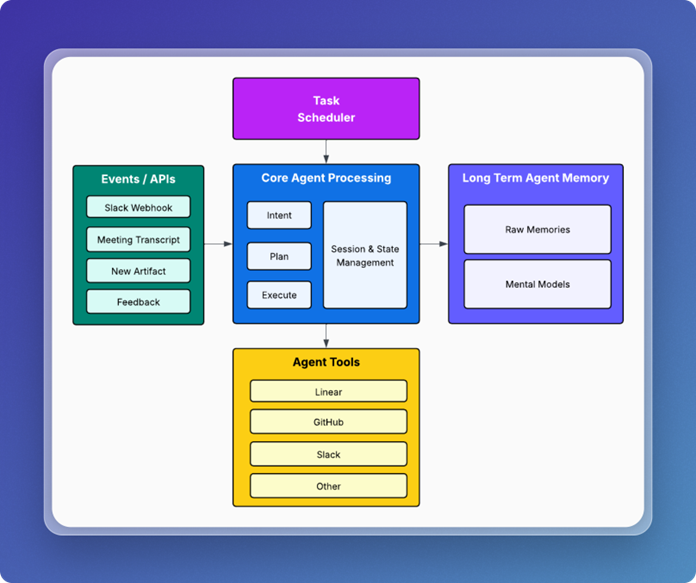
Jerri’s architecture consists of five main components:
- An API layer for interacting with the agent and providing new information to it.
- A scheduler for recurring tasks.
- The core agent logic responsible for task execution.
- The long-term memory processing and storage.
- A set of agent tools that let Jerri integrate with external tools we use.
Forming memories
The agent memory architecture we landed on was to separate memory processing out into two parts: raw memories and mental models. Raw memories represent the interactions and experiences Jerri has. Individual conversations, tool calls, documents and meeting transcripts were all considered raw memories. Mental models provide a way to capture the broader understanding of how memories fit together and allow Jerri to keep track of the bigger picture.
Raw memories are formed in a variety of ways. Every time someone interacts with Jerri on Slack, it forms a memory. When Jerri tries to perform a task or receives a meeting transcript, it forms new memories. These memories get tagged and enriched with metadata. We use an LLM to identify and extract the people, places and things contained within a raw memory. This processing prepares the memories so that we can search and find the right memories when we need to use them.
Onboarding Jerri
We didn’t want to start stuffing Jerri’s prompt with instructions. Our goal was to provide as little information in the prompts as possible. We wanted a way for Jerri to learn and to get better at his job over time; to adapt his behavior based on feedback and experiences — more like a human.
We didn’t want to simply shuffle around the problem of updating prompts to our mental models. In other words, we didn’t want to manually update the mental models every time Jerri made a mistake the way we would with prompts in the first version; we’d be fighting the same antipattern we were trying to correct.
At the same time, we needed some starting-point level of understanding to train Jerri on how we operated as a project team. For us, this was the equivalent of employee onboarding for our AI employee.
We created baseline mental models for key subjects that we thought Jerri needed to understand. We defined initial mental models to understand the product we were working on, our software development lifecycle, team member capabilities and project priorities. We also gave Jerri a mental model of his specific roles and responsibilities. We defined his initial responsibilities as tracking launches and making sure we weren’t forgetting important tasks.
We imposed a constraint that mental models could only be updated by having Jerri process new information or by giving Jerri feedback and having Jerri update his mental models based on that. Jerri would have to learn on the job, just like the rest of us.
Handling open-ended tasks
We didn’t want Jerri to be a simple workflow automation. That is, we didn’t want to preprogram Jerri with step-by-step instructions for how to complete individual tasks.
When a team member tags Jerri in a Slack channel or through DM, they can make any request they want. Each message comes into Jerri’s Slack webhook endpoint. This triggers the intent, plan and execution logic. Jerri uses an LLM to identify the user’s intent. The planning module retrieves the relevant mental models related to the user’s intention.
Based on the current mental model for Jerri’s roles and responsibilities, he can decide if he’s equipped to handle the user’s request. If so, the planner module creates a plan — usually a list of subtasks that Jerri needs to execute to achieve the immediate goal.
Local session and state management are used as a short-term memory buffer to track task execution as Jerri tries to fulfill any requests that come in. Each interaction with the user, every plan for completing a task, every tool call and every task outcome get persisted as memories.
These are important because they allow Jerri to do something most other agents can’t: learn.
Agent learning
There were two areas of learning we focused on most when building Jerri: task completion and feedback.
Task completion
Agents make mistakes. What they don’t do today is learn from those mistakes. When Jerri attempts to complete a task, mistakes can take different forms.
- Jerri can misunderstand the task and do something different from what the user intended
- Jerri can complete the task, but in an inefficient way
- Jerri can declare victory on a task that has not been solved
Most of the time, Jerri completes tasks successfully. Jerri gets feedback three ways: failed task attempts, user responses to completed work and a slash command we built into Slack.
Turning feedback into learning
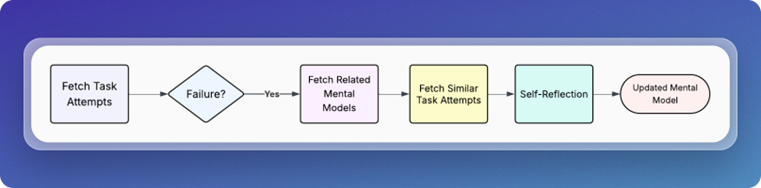
The mechanism that drives learning is self-reflection.
Using the task scheduler, we have Jerri wake up every few hours and check for new task failures. If it finds one, it will initiate the self-reflection process.
Chris Latimer
This process looks for differences between any successful attempts and any failures. It performs a deep analysis on the available data, then makes adjustments to the applicable mental models.
The next time Jerri receives a similar task, he has a more complete understanding of what worked and what didn’t in previous attempts.
Jerri’s sick day
AI employees might not call in sick, but they are susceptible to outages like any other piece of software. It wasn’t until Jerri stopped working that we realized how much we had come to rely on him.
One of Jerri’s scheduled jobs is to send us an agenda before our daily standup with any items the team needs to discuss. Before Jerri, we relied on a round-robin agenda where everyone talked about what they were going to do that day. Over time, we realized Jerri was doing a better job of focusing our discussions around key deliverables, risks and tasks. He would list specific questions for individual team members to answer.
We’d go over the list and discuss them as needed. Jerri would get the meeting transcript, update his mental models and take the new information into account. We found our meetings were more useful and productive than the standard go-around-the-room style standup.
We all joined the call and went to pull up the agenda, but it wasn’t there. The team had a laugh, realizing that we’d slowly counted on Jerri to keep us on track. At that moment, I felt like we achieved the mission I had given the team several months before. We had built a real AI project manager.
From chatbot to AI employee
Today, Jerri isn’t perfect, but we’ve come a long way from where we started. Jerri has moments where he sounds very LLM-like. He can be annoying when asking about tasks. But he’s also a lot more capable at handling complex tasks and analysis.
In many ways, we treat Jerri like an employee. We have Jerri perform self-assessments. We provide feedback. We set clear roles and responsibilities. We set expectations and we challenge him to exceed those expectations. Just like a real employee, sometimes he does and sometimes he falls short. Nobody’s perfect. Not even AI.
So what is the secret to building an AI employee that acts like an employee? Simple: Treat it like one.
This article is published as part of the Foundry Expert Contributor Network.
Want to join?
Read More from This Article: How to build AI employees that act more like employees and less like AI
Source: News